ANYCUBIC 4-in-1 Filament Hub for Kobra Review (2026)
As an Amazon Associate we earn from qualifying purchases. Links on this page are affiliate links.
To print in color, an ANYCUBIC ACE Pro feeds four filaments, but the extruder has one inlet. This 4-in-1 hub is the part in between: four tubes go in on one side and a single path goes to the extruder on the other. It snaps onto the extruder without tools. ANYCUBIC lists the Kobra 3, Kobra 3 Combo, Kobra 3 V2, Kobra 3 V2 Combo, Kobra S1, Kobra S1 Combo and Kobra 3 Max Combo; the title also names the Kobra X. The point is turning a non-combo printer into a combo setup, but you still need an ACE Pro box, which is not included. The spec sheet carries a Photon Ultra model code, which looks like a listing error. Our notes come from ANYCUBIC's listing.
What stands out
- Joins four filament lines into one
- Tool-free snap-in fit
- For Kobra 3, Kobra S1 and Kobra 3 Max
Who it fits
Good fit for
Owners of a plain Kobra 3, Kobra 3 V2 or Kobra S1 who have bought or plan to buy an ACE Pro, or combo owners replacing a damaged hub.
Who should skip it
Anyone without an ACE Pro, and owners of other brands' multi-color systems.
Verdict: A small but essential link between the ACE Pro and a Kobra extruder.
ANYCUBIC 4-in-1 hub specs
4 inputs, 1 output
Merges ACE Pro lines.
Snap-in fit
No tools.
Kobra 3 / 3 V2 / S1 / 3 Max
Listed fit, plus Kobra X in the title.
ACE Pro needed
Not included.
4.72 × 3.54 × 1.18in
Listed size.
Model code
Says Photon Ultra (error).
What the hub does in a combo setup
Each of the four ACE Pro slots has its own tube. The ACE Pro pulls one filament back and pushes the next forward, and the hub lets all four reach the same extruder inlet without swapping tubes by hand. It has no motor or sensor of its own as far as the listing says; the switching logic lives in the printer and the ACE Pro.
Fitting it
Snap the hub into the extruder's feed port, route the four ACE Pro tubes into its inputs and load filament through the printer menu. Pick this hub if you own one of the listed Kobra models and an ACE Pro; pick the full combo bundle if you have neither yet, since it comes with the box and the hub.
Before you order
Checks for the ANYCUBIC 4-in-1 filament hub.
Check before you buy
- Your printer is a listed Kobra model
- You have, or will buy, an ACE Pro
- You want four filaments on one extruder
- You can route four tubes to the head
The product at a glance
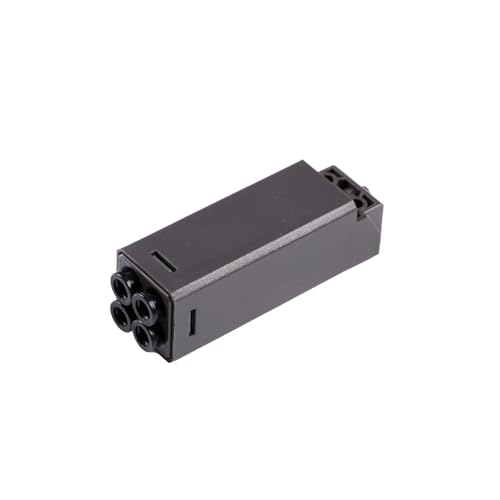
ANYCUBIC Kobra 4-in-1 Filament Hub
Best for: Kobra plus ACE Pro setups
- Dimensions
- 3.54 × 4.72 × 1.18 inches
View on Amazon: ANYCUBIC Kobra 4-in-1 Filament Hub Affiliate link
ANYCUBIC 4-in-1 filament hub: joins four ACE Pro lines into one extruder inlet on Kobra 3, Kobra 3 V2, Kobra S1 and Kobra 3 Max printers.
Pros
- Tool-free fit
- Turns a Kobra into a combo setup
- Cheap replacement part
Cons
- ACE Pro sold separately
- Odd model code on the listing
Good fit if
- You own a Kobra and an ACE Pro
- Your hub is damaged
Skip if
- You have no ACE Pro
Verdict: The missing link for a do-it-yourself Kobra combo.
Specifications side by side
| Spec | ANYCUBIC Kobra 4-in-1 Filament Hub |
|---|---|
| Dimensions | 3.54 × 4.72 × 1.18 inches |
| Model | Photon Ultra-FR&220829 |
Frequently asked questions
Does the ANYCUBIC 4-in-1 hub include an ACE Pro?
No, it is the hub only.
Which printers take the ANYCUBIC 4-in-1 hub?
Kobra 3, Kobra 3 V2, Kobra S1 and Kobra 3 Max Combo, plus combo versions; the title adds Kobra X.
Do I need tools to fit the ANYCUBIC filament hub?
No, it snaps onto the extruder.
Can the 4-in-1 hub make my Kobra 3 multi-color?
With an ACE Pro, yes; the hub links the box to the extruder.
What does the Photon Ultra model code on the hub mean?
It looks like a listing error; the hub is a Kobra part.
Featured in
See also
- anycubic mini purifier heater review
- anycubic photon mono 4 LCD review
- anycubic photon p1 heated resin vat review
- anycubic 5pcs 10 1 inch acf high review
- anycubic kobra 3 v2 replacement printhead review
- ANYCUBIC Kobra 3 Max Printhead Assembly Review (2026): A Spec-Based Look
- ANYCUBIC FEP Film 2-Pack for Photon Mono 2 and Mono 4 Review: Specs, Pros and Cons
- ANYCUBIC Kobra 3 USB Monitoring Camera Review: Who It Fits and Who Should Skip It
- anycubic kobra 4 auto leveling 3d printer review
- easycargo 30pcs 3d printer heatsink review