HOCENWAY Fly ADXL345 USB Accelerometer for Klipper Review
As an Amazon Associate we earn from qualifying purchases. Links on this page are affiliate links.
This is a sensor board, not a printer: HOCENWAY's FLY-ADXL345 is an accelerometer that Klipper uses to measure each axis's resonance and pick input shaper settings, which reduces ringing at high speed. Its USB Type-C connection is the selling point. Older ADXL345 boards wire to the Raspberry Pi's SPI pins with several jumper leads; this one plugs in with a single cable. HOCENWAY lists Raspberry Pi, Gemini V1, V1.1, V2 and V3 and other Klipper machines, and the title names Voron V0.1 and 2.4, VzBot and HevORT. The package is the module only, so supply your own USB-C cable. The board is 0.81 x 0.61 x 0.2 inches, small enough to mount on a toolhead. It is Klipper-only; Marlin printers cannot use it. Setup docs are at Mellow's FLY site (mellow.klipper.cn). The details are HOCENWAY's.
What stands out
- ADXL345 accelerometer for Klipper
- USB Type-C connection
- Small board for toolhead mounting
Who it fits
Good fit for
Klipper users who want to tune input shaping with a simple USB connection.
Who should skip it
Marlin or stock-firmware printer owners, and anyone expecting a cable in the box.
Verdict: An easy way to run Klipper resonance tests without SPI wiring.
FLY-ADXL345 USB specs
ADXL345
3-axis accelerometer.
USB Type-C
Single-cable connection.
Klipper
Firmware required.
Raspberry Pi, Gemini V1-V3
Listed hosts.
0.81 x 0.61 x 0.2 in
Board size.
Module only
No cable listed.
What it measures
Mounted to the toolhead or bed, the sensor records vibration while Klipper sweeps each axis through a range of frequencies. Klipper then suggests an input shaper type and frequency for each axis, which you save in the config. The result is less ghosting on fast prints, and you can usually raise acceleration afterwards.
Using it
Mount the board firmly, since a loose sensor reads its own wobble. Add it as a USB MCU in Klipper following Mellow's guide, run the resonance test for X and Y, save the results, then unplug it until the next rebuild. Choose the HOCENWAY USB board if your host has a free USB port and you want no SPI wiring; choose an SPI ADXL345 if you already have the wiring and want the cheapest sensor.
Before you order
Checks for the HOCENWAY FLY-ADXL345.
Check before you buy
- Your printer runs Klipper
- Your host has a free USB port
- You have a USB-C cable long enough
- You can mount it rigidly
The product at a glance
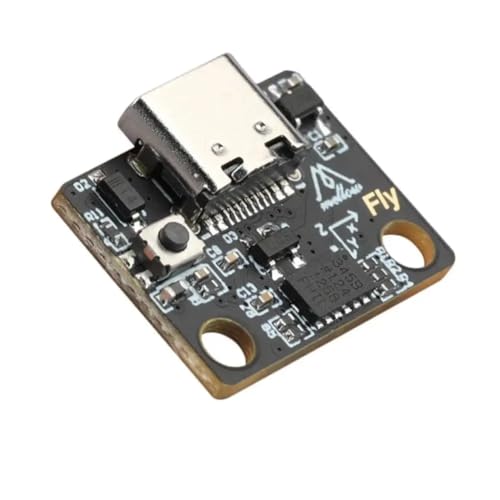
HOCENWAY Fly ADXL345 USB Accelerometer
Best for: Klipper input shaping
- Dimensions
- 0.81 × 0.61 × 0.2 inches
- Weight
- 0.35 ounces
View on Amazon: HOCENWAY Fly ADXL345 USB Accelerometer Affiliate link
HOCENWAY FLY-ADXL345 USB-C accelerometer for Klipper input shaping; listed for Raspberry Pi, Gemini and Voron builds.
Pros
- One-cable USB connection
- Small enough for a toolhead
- Documented by Mellow
Cons
- Klipper only
- No cable included
Good fit if
- You run Klipper
- You want to tune input shaping
Skip if
- Your printer runs Marlin
Verdict: A simple input shaping tool for Klipper users.
Specifications side by side
| Spec | HOCENWAY Fly ADXL345 USB Accelerometer |
|---|---|
| Dimensions | 0.81 × 0.61 × 0.2 inches |
| Weight | 0.35 ounces |
Frequently asked questions
What does the FLY-ADXL345 do?
It measures printer resonance so Klipper can set input shaping.
Does the HOCENWAY ADXL345 work with Marlin?
The listing describes it for Klipper firmware only.
How does the FLY-ADXL345 connect?
Through USB Type-C.
Is a cable included with the FLY-ADXL345?
The package lists only the module.
Which hosts does HOCENWAY list for the FLY-ADXL345?
Raspberry Pi and Gemini V1, V1.1, V2 and V3, plus other Klipper machines.
See also
- olzzdda neptune 4 plus max hotend review
- enomaker p1p p1s hardened steel hotend review
- topcube bambu lab a1 combo enclosure review
- best 3d printers under 200
- best 3d printers under 300
- Best 3D Printers Under $500 in 2026: 7 Picks Ranked by Specs
- Best 3D Printers Under $1000: 6 Spec-Based Picks
- 6 Best 3D Printers Under $1500, Compared
- rollo USB shipping label printer review
- tigerxbang paddle board review